
Starting your first website can feel overwhelming, especially when you factor in the costs involved. But the good news is, with a bit of knowledge and some savvy choices, you can save a significant amount of money without sacrificing quality. In this guide, we’ll walk through the essentials of hosting a website, highlight common financial pitfalls, and show you where you can cut costs while still getting the website of your dreams up and running.
What You Really Need for a Website
Before diving into the specifics of saving money, it’s important to understand what you’ll need to get your website off the ground. There are four main components:
- Server
A server is where your website’s data is stored and accessed. You can choose between various types of hosting, such as shared hosting (where your site shares a server with others), VPS (virtual private server), or dedicated hosting. For most beginners, shared hosting is a great choice because it’s affordable and meets the needs of smaller websites. We’ll dive into hosting types in a bit more detail later on.
- Domain
Your domain is the unique address of your website (like www.yourwebsite.com). Domains can vary greatly in price depending on the provider and the domain extension (.com, .net, etc.). Some hosting companies offer free domains for the first year, which is a great way to save initially. However, be sure to check the renewal fees, as they can be much higher after the first year.
- Email Hosting
If you want a professional email address (e.g., yourname@yourwebsite.com), you’ll need email hosting. Some hosting providers bundle this service with their hosting packages, while others charge extra. If you’re looking to save, services like Zoho Mail offer free plans that are perfect for beginners.
- Content
Of course, no website is complete without content! Fortunately, creating content doesn’t need to be expensive. WordPress, one of the most popular content management systems (CMS) in the world, offers countless free themes and plugins to help you create a professional-looking site without spending a dime on design or functionality.
Common Financial Pitfalls When Hosting a Website
Starting a website can come with hidden costs if you’re not careful. Here are a few common mistakes to avoid:
- Unnecessary Add-Ons or Plugins
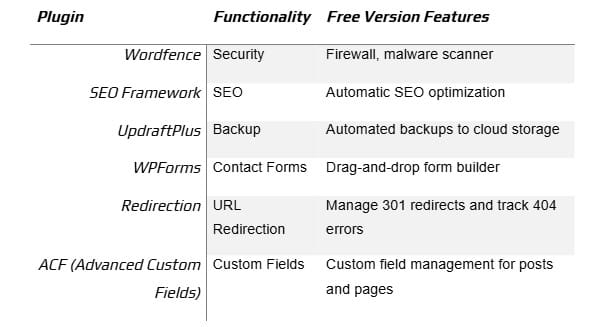
When purchasing hosting, many companies offer various add-ons, such as backups, security packages, or SEO tools. While some of these might be useful, many are unnecessary for beginners. For example, WordPress offers plenty of free plugins for security (like Wordfence) and SEO (like The SEO Framework), so there’s no need to pay extra upfront.
- The Wrong Server Type
Choosing the wrong type of server can also drain your budget. Many beginners think they need a VPS or dedicated hosting right from the start, but shared hosting is usually more than enough for small websites. As your site grows, you can always upgrade.
- Over-the-Top Security
While security is essential, paying for top-tier security plans when you’re just starting out is unnecessary. You likely don’t need enterprise-level security for a basic blog or small business site. Opt for free or low-cost solutions, such as the Cloudflare free tier, which offers basic protection.
Here’s How to Save Money When Hosting Your First Website
Now that you know what to avoid, let’s dive into how to actually save money when hosting your first site.
General Tips
- Read the Fine Print: Many hosting providers offer attractive introductory rates, but renewal prices can skyrocket. Make sure you’re aware of the long-term costs, including cancellation fees.
- Longer Billing Cycles: Opting for longer billing cycles (e.g., paying for two or three years upfront) is often much cheaper than monthly billing. This can save you a lot over time.
Choose the Right Hosting Type
For most small websites, shared hosting is the best option. It’s affordable, easy to manage, and perfectly capable of supporting a site with under 500 pages. Providers like BlueHost frequently offer discount codes, so be sure to check sites like The Blog Starter for deals.
Here’s a quick comparison of hosting types:

Be Smart with Domain Registration
Big-name domain registrars, like GoDaddy, Namecheap, and Dynadot, often run promotional deals on domains. It’s worth waiting for a sale or using a coupon code. Just be cautious of renewal fees, as they can climb substantially after the first year.
Use Free or Low-Cost Email Hosting
Rather than paying for email hosting through your website host, consider services like Zoho Mail, which offers free email hosting for up to five users. Another budget-friendly option is MXroute, which provides unlimited domains and email accounts for as little as $49/year.
Leverage Free Stock Images
Stock images can add polish to your website, but they don’t have to break the bank. Sites like Pixabay, Unsplash, and Pexels offer thousands of high-quality, royalty-free images. If you want to take things a step further, tools like Midjourney allow you to create unique images through AI at minimal cost.
Recommended Free WordPress Plugins
When setting up a WordPress website, you don’t need to spend money on premium plugins. There are several excellent free plugins that offer great functionality. Here’s a comparison of some popular ones:
Final Thoughts: Budget-Friendly Website Hosting for Beginners
Starting a website doesn’t have to drain your wallet. With a bit of research and careful planning, you can avoid common financial traps and set up a fully functional, professional site on a budget. From choosing the right hosting plan to taking advantage of free tools and resources, there are plenty of ways to cut costs without sacrificing quality.
Read More


Do you love to travel but hate to spend a lot of money on…

Prom night doesn't have to cost a lot of money. With a little creativity, you…

n my book, Effort-Less Wealth – Smart Money Habits At Every Stage of Your Life,…

You can’t get rich without investing unless you inherit money from a wealthy relative. If…

Saving through a financial institution such as a bank is a safe and secure way…
Investing in new windows is often viewed as a luxury rather than a necessity in…
Comments